
Quick Summary
- An ergonomic office chair supports the spine’s natural lumbar curve and can reduce lower-back strain during long work sessions; it is a comfort tool, not a medical cure.
- Adjustable lumbar height, seat depth, and seat height are the three controls that do the most work for your posture and comfort.
- Fit matters more than price: a chair that suits your body proportions outperforms a costly model that cannot adjust to your size.
- Movement breaks complement good seating; changing position and standing briefly throughout the day reduces risks from prolonged static sitting.
- Severe pain, leg weakness, numbness, or bladder and bowel changes need prompt medical evaluation, not a new chair purchase.
An ergonomic office chair is a seat designed to support the natural curves of your spine, reduce strain on your lower back, and adjust to your proportions rather than making you adapt to a fixed shape. Choosing a chair that fits your body can make a real difference in how you feel during and after the workday. An ergonomic chair isn’t a medical treatment and can’t diagnose or cure the cause of your pain. What it can do is give your body better support during the many hours you spend sitting. This guide covers what to look for, how to compare options by body type and budget, and when professional care matters more than any chair.
What Makes an Ergonomic Office Chair Good for Your Back?
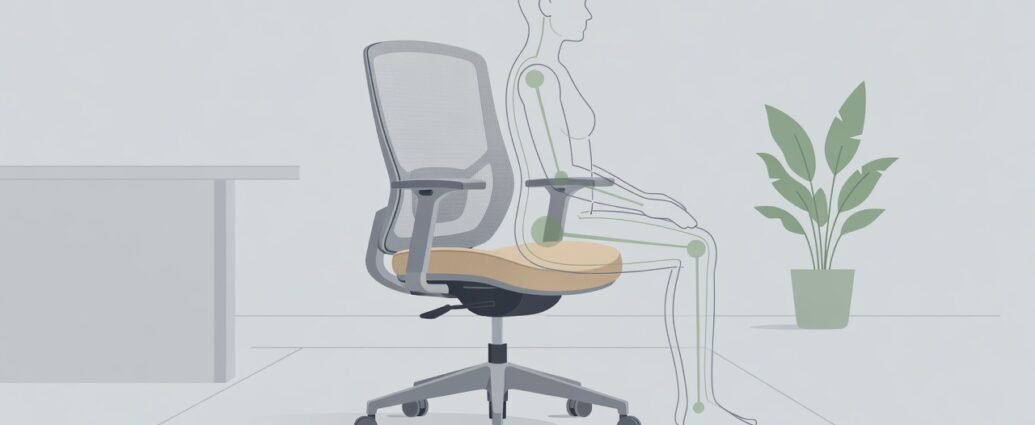
An ergonomic office chair is good for your back because it is built around the body’s natural posture, not a one-size-fits-all shape. The design goal is to keep your lower back (the lumbar region) gently supported, your hips level, your knees at roughly a right angle, and your feet resting comfortably on the floor or a footrest. When those conditions are met, your muscles can stay relatively relaxed rather than working constantly to hold you upright.
Sitting without lumbar support, arching the lower back excessively, and rounding the spine are all linked to musculoskeletal discomfort in office workers, according to the CCOHS sitting practices guide. A well-fitted chair addresses each of those patterns by offering adjustable support rather than making you hold a position through muscle effort alone.
The lumbar region is the lower spine’s five vertebrae. Keeping a gentle inward curve at that level while seated helps distribute load more evenly across the discs and surrounding tissues, something occupational health professionals have long recognized. A chair that lets you position lumbar support at the right height for your spine can help you hold that curve without active muscle work.
An ergonomic chair cannot replace medical evaluation for back pain. The NIAMS back pain overview explains that back pain has many potential causes and that assessment depends on symptoms, history, and physical examination. No chair replaces that evaluation. A good ergonomic chair is a supportive tool, not a treatment.
Key Features of an Ergonomic Office Chair for Back Comfort
The four features that consistently appear in occupational health guidance for back comfort are adjustable lumbar support, seat height range, seat depth adjustment, and a stable five-point base. Armrest height and backrest recline add further fit options that matter especially during longer desk sessions.
Lumbar Adjustability: The Most Important Control
Adjustable lumbar support height is the most important chair control for lower back comfort because it lets you match the support pad to the curve of your own spine. OSHA chair ergonomics guidance identifies two essential chair characteristics: a backrest that supports the lower spine, and seat depth that lets you sit fully back while keeping clearance behind the knees. Some chairs also allow you to adjust the depth or firmness of the lumbar pad, which can help people who need more or less pronounced support at their specific spinal level.
When comparing lumbar options, look for a pad that travels vertically by several centimeters. If the adjustment range is very limited, the pad may sit too high for a shorter torso or too low for a taller one, and no amount of seat adjustment will correct that mismatch.
Seat Depth, Armrests, and Recline Explained
Seat depth matters most for people who are taller or shorter than average. A seat pan that’s too long makes you slide forward and lose contact with the backrest. One that’s too short builds pressure under the thighs. A practical rule used in many ergonomics programs is to allow roughly two to three finger-widths of space between the front edge of the seat and the back of your knee when sitting fully back.
Adjustable armrests reduce shoulder and neck load by letting your arms rest near desk height without lifting or dropping the shoulders. Armrests set too high push the shoulders up and compress the upper trapezius. Armrests set too low encourage hunching forward and rounding the mid-back. A backrest with a recline lock lets you vary your sitting angle during the day, relieving sustained pressure on any single spinal structure.
Tip: Before buying online, measure the distance from the back of your knee to your seat with a tape measure while sitting in your current chair. Compare that figure to the seat depth range listed in the product specifications so you can confirm the chair will fit before ordering.
Choosing an Ergonomic Office Chair by Body Type and Budget
Matching Your Ergonomic Office Chair to Your Body Size
Taller users need a seat height that adjusts higher than a standard chair offers, plus a taller backrest that reaches the mid or upper back. Shorter users need a lower minimum seat height and a shorter seat depth so their feet reach the floor without strain. If the chair can’t be lowered enough for your feet to rest flat, an adjustable footrest is a practical, affordable alternative that keeps the chair height at a level that works for desk alignment.
Larger-bodied users should check weight capacity and seat width before buying. A chair that feels unstable or compresses noticeably under your weight isn’t properly rated for your body, regardless of its other features. For petite users, the two most important specifications to verify before ordering are a seat depth that can be shortened and a lumbar pad that adjusts low enough to reach the small of a shorter back.
A higher price doesn’t always mean a better fit. The most useful question is whether a chair offers the specific adjustments your proportions require. Many mid-range chairs include a seat depth slide and adjustable lumbar height, which matter more for comfort than premium upholstery or decorative features. A chair with a trial period or a clear return policy reduces the risk of keeping something that doesn’t work for your body.
| Chair Feature | Budget Tier | Mid-Range Tier | Premium Tier |
|---|---|---|---|
| Adjustable lumbar height | Rarely included | Often included | Typically included |
| Seat depth adjustment | Rarely included | Often included | Typically included |
| Height, width, depth, and pivot armrests | Rarely included | Sometimes included | Typically included |
| Tension-adjustable recline | Rarely included | Often included | Typically included |
| High weight capacity option | Limited selection | Some models | More options available |
| Manufacturer warranty length | Shorter | Moderate | Longer |
| Trial or return period | Limited or absent | Often available | Often available |
Tip: Contact the manufacturer or retailer directly to ask about the return window, restocking fees, and whether replacement parts such as lumbar pads and armrest caps are sold separately. These factors affect long-term value as much as the initial price.
How to Adjust Your Ergonomic Office Chair Step by Step
A chair with many adjustment options only helps if each is set correctly for your body. Work through these steps in order, seated at your actual desk with your usual footwear on (or barefoot, if that’s how you normally work). Skipping the sequence and going straight to lumbar height typically produces a poor fit because the lumbar position depends on where your seat height and depth land first.
Seat height first. Lower the seat until your feet rest flat on the floor or on a footrest, with your knees at roughly a right angle. If raising the seat to match desk height lifts your feet off the floor, use a footrest rather than leaving them unsupported. Feet dangling in the air place extra load on the back of the thighs and can contribute to discomfort over a full workday.
Seat depth second. Slide the seat pan forward or back until you can fit a few fingers comfortably between the seat edge and the back of your knee. This prevents sustained pressure under the thigh and helps you sit fully back and maintain contact with the lumbar support.
Lumbar height third. The lumbar pad should contact the inward curve of your lower back (roughly at belt level for most people, though this varies with torso length). If the pad presses into your mid-back or falls too low, adjust the pad height until it fills the natural hollow without pushing the lower back into an exaggerated arch.
Armrests fourth. Set them so your shoulders stay relaxed and your forearms rest lightly near desk height. Armrests that are too high push the shoulders upward. Armrests that are too low cause the torso to lean forward and lose back support.
Desk and monitor last. The OSHA workstation setup guide recommends a stable arrangement that reduces awkward neck and trunk positions. Position your monitor, keyboard, and mouse so you don’t need to lean forward or repeatedly rotate your neck and trunk to see the screen or reach the keys. A monitor stand, keyboard tray, or external mouse can all help reduce compensatory postures that build strain over long sessions.
Lumbar Support and Sitting Time: What the Evidence Shows

No chair alone resolves all risks from sedentary desk work. Occupational health guidance consistently identifies sustained static posture without adequate support as a contributor to musculoskeletal discomfort. The CCOHS sitting guidance lists poor body support and stability, excessive lumbar arching, and rounding of the lower back among the seated practices most associated with office-related discomfort.
Occupational health research consistently highlights that movement, not seating equipment alone, plays a meaningful role in managing the risks of long work sessions.
A widely shared rule among occupational health professionals: change your sitting position and stand briefly at regular intervals throughout the workday. Static posture carries its own risks over time regardless of chair quality. Broader research in this area tends to suggest that movement habits matter alongside equipment choices, though the specific evidence for individual products versus general workstation improvements is more limited.
Chair features support your comfort during the time you are seated. Movement breaks support your body during the time you would otherwise stay still. Neither fully replaces the other, and both are worth building into your daily routine.
When a New Chair Is Not Enough: Symptoms That Need Medical Care
A new chair can improve comfort for mild, posture-related discomfort but is not an appropriate first response to pain that may have a medical cause. The NINDS low back pain resource describes low-back pain as potentially involving muscles, ligaments, joints, discs, and nerves, and emphasizes that neurological symptoms require medical assessment. Patient education resources from the American Academy of Orthopaedic Surgeons, available through OrthoInfo patient guides, can help you understand when a spine-related symptom warrants in-person evaluation or imaging.
See a doctor soon if you experience:
- Lower back pain that gets progressively worse over several days despite rest and position changes
- Pain that radiates down one or both legs, with tingling, burning, or a sharp shooting sensation
- Weakness in a leg or foot that makes walking steadily or lifting the foot difficult
- Back pain accompanied by unexplained weight loss or low-grade fever
- Persistent pain that began after a fall, accident, or direct impact to the spine
Seek emergency care immediately if you notice:
- Sudden numbness, tingling, or weakness in both legs at once
- Loss of bladder or bowel control
- Numbness in the groin, inner thighs, or saddle area (the region that would contact a bicycle seat)
- Severe back pain following significant trauma or a fall from height
These symptoms can indicate a serious nerve or structural problem. Buying a new chair is not the right response when these signs are present. Contact a healthcare professional promptly.
Key Takeaways
- Before purchasing, confirm that lumbar height, seat depth, and seat height are all independently adjustable; these three controls matter more than price tier or brand recognition.
- Before ordering online, measure your current seat depth and minimum sitting height so you can compare them directly to published product specifications.
- Follow the five-step fitting protocol (seat height, seat depth, lumbar height, armrests, desk setup) each time you switch to or try a new chair.
- Take a brief standing break and walk a short distance at regular intervals throughout the day; a well-adjusted chair complements movement but does not replace it.
- If a trial or return period is available, use it: testing the chair over at least one full workweek is the most reliable way to know whether it suits your body.
- When pain is severe, progressive, or accompanied by leg weakness, numbness, or changes in bladder and bowel function, seek medical evaluation promptly rather than waiting to see whether a new chair helps.
Conclusion
The right ergonomic chair fit requires matching three adjustable features to your body: lumbar height, seat depth, and seat height. When those three controls are tuned to your proportions, the chair stops working against your posture and starts working with it. That difference is felt over the course of a long workday.
Use the five-step fitting protocol as your starting point each time you try or buy a chair. Measure your seat depth with a tape measure before comparing product specifications. Check that the lumbar pad reaches your lower back when you sit fully back, and confirm that a trial or return period is available so you can test the chair in your actual working conditions. No showroom visit fully replicates hours of real use.
Keep the chair’s role in perspective: occupational health guidance consistently notes that movement throughout the day matters alongside what you sit on. Standing up briefly, changing position, and stepping away from the desk are habits that complement any chair, however well designed. When back pain is severe, persistent, or accompanied by neurological signs, seek clinical evaluation. No chair can diagnose what’s causing it. Use this guide to make a better-informed purchase, then let a qualified professional guide your care.
Frequently Asked Questions
- What is the best ergonomic office chair for lower back pain?
- The ideal chair depends on your body dimensions, working hours, and specific discomfort patterns. A good starting point is to prioritize adjustable lumbar height, seat depth, and seat height over brand name or price alone. No single model fits every body equally well, so a generous return or trial policy matters as much as the specifications.
- Which chair features matter most for lower-back comfort?
- Lumbar height adjustment tops the list because it lets you position support at the natural curve of your own spine. Seat depth and seat height adjustments follow closely. These three controls together account for most of the posture benefit a chair can offer during a long workday.
- How should I adjust an ergonomic office chair for back pain?
- A practical sequence: raise or lower the seat until your feet rest flat on the floor, then slide the seat pan so a few fingers fit between the seat edge and the back of your knee, and dial the lumbar pad to the hollow of your lower back. Finish by aligning armrests and desk position last.
- Can an ergonomic office chair help with sciatica or a herniated disc?
- A well-fitted chair may reduce postural irritation of sensitive spinal structures, but it cannot treat the underlying cause. If you have sciatica or disc symptoms, the National Institute of Neurological Disorders and Stroke recommends medical assessment, particularly when numbness, leg weakness, or bowel and bladder changes are present alongside the pain.
- When should back pain be evaluated by a healthcare professional instead of managed with a new chair?
- Seek care when pain is severe, worsens progressively, or arrives alongside leg weakness, tingling, groin or inner-thigh numbness, or changes in bladder and bowel function. These patterns point to a nerve or structural issue that needs clinical diagnosis, not a seating upgrade.
This article is for informational purposes only and does not replace professional medical advice. Always consult your doctor before starting any treatment.